---
title: "View Button & Section Configuration"
description: "Control keyphrase sourcing, synonym fields, and assessment filtering per blueprint."
canonical_url: "https://kirby.tools/docs/seo-audit/configuration/local"
---
# View Button & Section Configuration
> Control keyphrase sourcing, synonym fields, and assessment filtering per blueprint.
Kirby SEO Audit can be added to Panel views via a **view button** (recommended) or a **section**, and both can be used together. The section adds the `label` and `persisted` properties.
## View Button Configuration
Add the `seo-audit` view button to a site or page blueprint, alongside default buttons such as `preview` and `settings`. The analysis needs an HTML preview URL, so file views are out of scope.
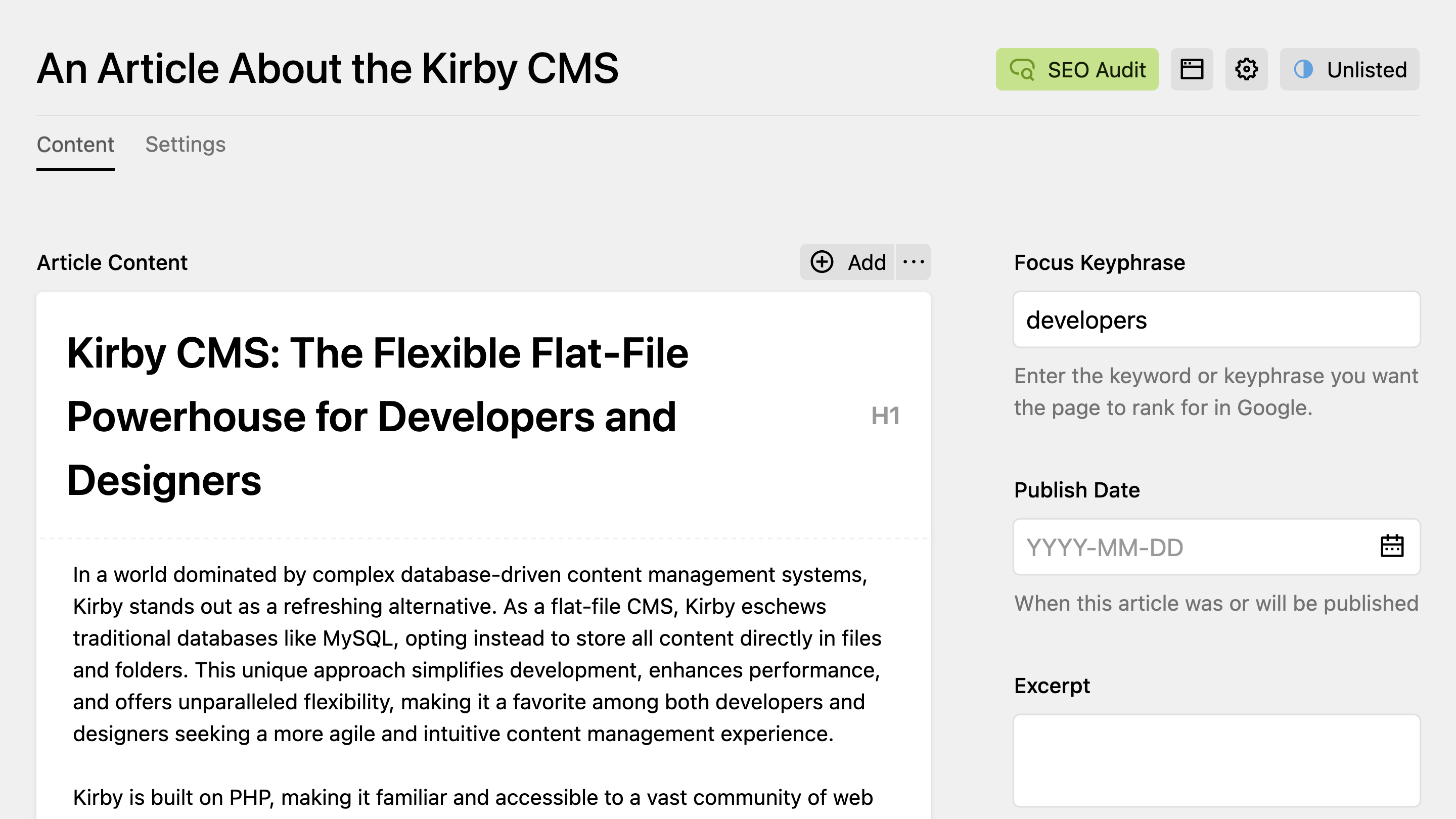
Clicking the **SEO Audit** view button immediately runs a SEO and readability analysis for the current page and opens the results in a Panel dialog.
### Basic Setup
To add the `seo-audit` view button to a Panel view, set the `buttons` option in the corresponding blueprint. Listing `buttons` replaces Kirby's defaults, so name the ones you want to keep – the default set differs per model, and `seo-audit` goes wherever it suits the view:
```yaml [site.yml]
buttons:
- seo-audit
- open
- preview
- languages
```
```yaml [pages/default.yml]
buttons:
- seo-audit
- open
- preview
- "-" # Kirby's default divider
- settings
- languages
- status
```
### Advanced Configuration
When configuring the view button in blueprints, use the available properties as props for the `seo-audit` button. For example, to define a field for the keyphrase and limit the assessments to a few selected ones, you can use the following configuration:
```yaml [pages/default.yml]
buttons:
seo-audit:
keyphraseField: metaKeyphrase
assessments:
- metaDescriptionKeyword
- metaDescriptionLength
- titleWidth
- images
- textLength
contentSelector: "#main"
open: true
preview: true
settings: true
languages: true
status: true
```
## Section Configuration
As an alternative to the view button, you can add a SEO Audit section to your blueprint. The section displays analysis results directly within the page content area instead of in a dialog.
### Basic Setup
To add the SEO Audit section to a blueprint, include the following configuration:
```yaml [pages/default.yml]
sections:
seoAudit:
type: seo-audit
```
This is how the section will render in the Panel:
Click the **Analyze** button to run a SEO and readability analysis on the current page. Results are grouped into Good, OK, Bad, and Feedback – empty groups are omitted:
## Shared Properties
Snippets below show only the property line. Wrap them under `buttons.seo-audit` (view button) or under `sections.` with `type: seo-audit` (section) – see the scaffolds above.
### `keyphraseField`
If you want to include keyword/keyphrase assessments in your SEO analysis, you need to define a field in your blueprint that contains the keyphrase for the given page. Alternatively, use the `keyphrase` property (see below). Then, the editor can **enter the keyword or keyphrase for which they want the page to rank in Google.**
Set the `keyphraseField` property to select which field of the current page model contains the keyphrase.
```yaml [pages/default.yml]
buttons:
seo-audit:
# Reference the keyphrase field for the view button
keyphraseField: metaKeyphrase
sections:
content:
type: fields
fields:
# Define the keyphrase field
metaKeyphrase:
label: SEO Keyphrase
type: text
help: The main keyword you want this page to rank for
seoAudit:
type: seo-audit
# Reference the keyphrase field for the section
keyphraseField: metaKeyphrase
```
Unless you explicitly include them in the `assessments` property, all keyphrase assessments will be skipped if no `keyphraseField` is defined.
### `keyphrase`
If you do not want the editor to enter a keyphrase manually, you can set a default keyphrase for SEO analysis. Alternatively, you can use a **Kirby query** to resolve the keyphrase dynamically.
**When to use which:**
- Use `keyphraseField` when editors should enter their own keyword per page.
- Use `keyphrase` for static keywords or when pulling from a parent page via query.
```yaml
keyphrase: developers
```
A Kirby query resolves against the current page, so the keyphrase can follow the content:
```yaml
keyphrase: "{{ page.title.value }}"
```
### `synonymsField`
Add synonyms to your keyphrase to avoid repeating the same keyphrase over and over again. Not only will readers like this, but it will also help Google to better understand what your content is about.
Set the `synonymsField` property to indicate which field of the current page model contains the synonyms.
```yaml [pages/default.yml]
buttons:
seo-audit:
synonymsField: metaSynonyms
sections:
content:
type: fields
fields:
metaKeyphrase:
label: SEO Keyphrase
type: text
help: The main keyword you want this page to rank for
metaSynonyms:
label: Keyphrase Synonyms
type: tags
help: Alternative keywords and variations
seoAudit:
type: seo-audit
keyphraseField: metaKeyphrase
synonymsField: metaSynonyms
```
### `synonyms`
Similar to the `keyphrase` property, which is an alternative to the `keyphraseField`, you can set the `synonyms` property directly in the blueprint. This allows you to define synonyms inline, eliminating the need for a separate field that an editor would have to fill in.
```yaml
keyphrase: SEO Audit
synonyms:
- Kirby
- SEO
- Audit
```
A Kirby query resolves in the string form, and its result is split on commas – a list is taken as written, placeholders included:
```yaml
synonyms: "{{ page.metaSynonyms }}"
```
### `assessments`
Kirby SEO Audit comes with a set of assessments used to analyze page content. You can enable or disable individual assessments by setting the `assessments` property. All assessments are enabled by default.
For a list of available SEO checks, see the [Assessments Guide](/docs/seo-audit/guide/assessments) page.
Here is an example of a blueprint configuration that only includes a subset of assessments:
```yaml
assessments:
# Select the assessments you want to include
- metaDescriptionKeyword
- metaDescriptionLength
- titleWidth
- images
- textLength
- imageKeyphrase
```
### `contentSelector`
The `contentSelector` property lets you define a CSS selector that specifies which part of the page should be analyzed. Use this to exclude navigation, footers, or sidebars from analysis – this prevents the plugin from flagging repetitive content that appears on every page.
By default, the plugin uses the `body` tag to select the content of the page. To analyze only the content of a specific element, set the `contentSelector` property:
```yaml
contentSelector: "#main:not(.sidebar):not(.footer)"
```
The `contentSelector` also supports querying for multiple elements. For instance, to select all elements with the class `.seo-audit-allowed` while excluding elements certain elements with the class `.seo-audit-ignore`, you can use the following selector: `.seo-audit-allowed > *:not(.seo-audit-ignore)`.
To debug the content used for the SEO analysis, you can set the log level to `info` or higher. This will log the extracted HTML to the console:
```yaml
contentSelector: ".seo-audit-allowed > *:not(.seo-audit-ignore)"
logLevel: info
```
### `links`
The analysis results contain links to recommendation articles on [Yoast.com](https://yoast.com) that explain the individual assessments in more detail. While these links may be helpful, you may want to disable them for privacy reasons or to avoid distracting the editor.
To disable any links in the SEO report, set the `links` property to `false`:
```yaml
links: false
```
### `logLevel`
Controls how much the plugin logs to the browser console during analysis. Available levels are `error`, `warn` (default), `info`, and `debug`. It can also be set [globally](/docs/seo-audit/configuration/global#loglevel); a blueprint value overrides it.
```yaml
logLevel: info
```
## Section-Only Properties
### `label`
The plugin provides a section label based on the current Panel language. However, you can customize the label by setting the `label` property.
To change the label, set the `label` property to your desired text:
```yaml [sections/seo-audit.yml]
type: seo-audit
label: SEO Report
```
### `persisted`
By default, SEO reports are saved to the browser's local storage. This allows editors to close the Panel and return later without rerunning the analysis. It is also useful for comparing "before" and "after" results when optimizing content.
To disable saving the analysis, set the `persisted` property to `false`:
```yaml [sections/seo-audit.yml]
type: seo-audit
persisted: false
```
---
Every page of this site as Markdown: