---
title: "View Button & Section Configuration"
description: "Per-blueprint controls for the view button and section – override defaults, scope translatable fields, customize labels."
canonical_url: "https://kirby.tools/docs/content-translator/configuration/local"
---
# View Button & Section Configuration
> Per-blueprint controls for the view button and section – override defaults, scope translatable fields, customize labels.
Kirby Content Translator can be added to Panel views via a **view button** (recommended) or a **section**. Both approaches support the same configuration properties and can be used together.
## View Button Configuration
The Content Translator view button can be added to any Panel view (site, page, file) alongside the default buttons like the languages dropdown. It provides a dropdown menu with translation actions.
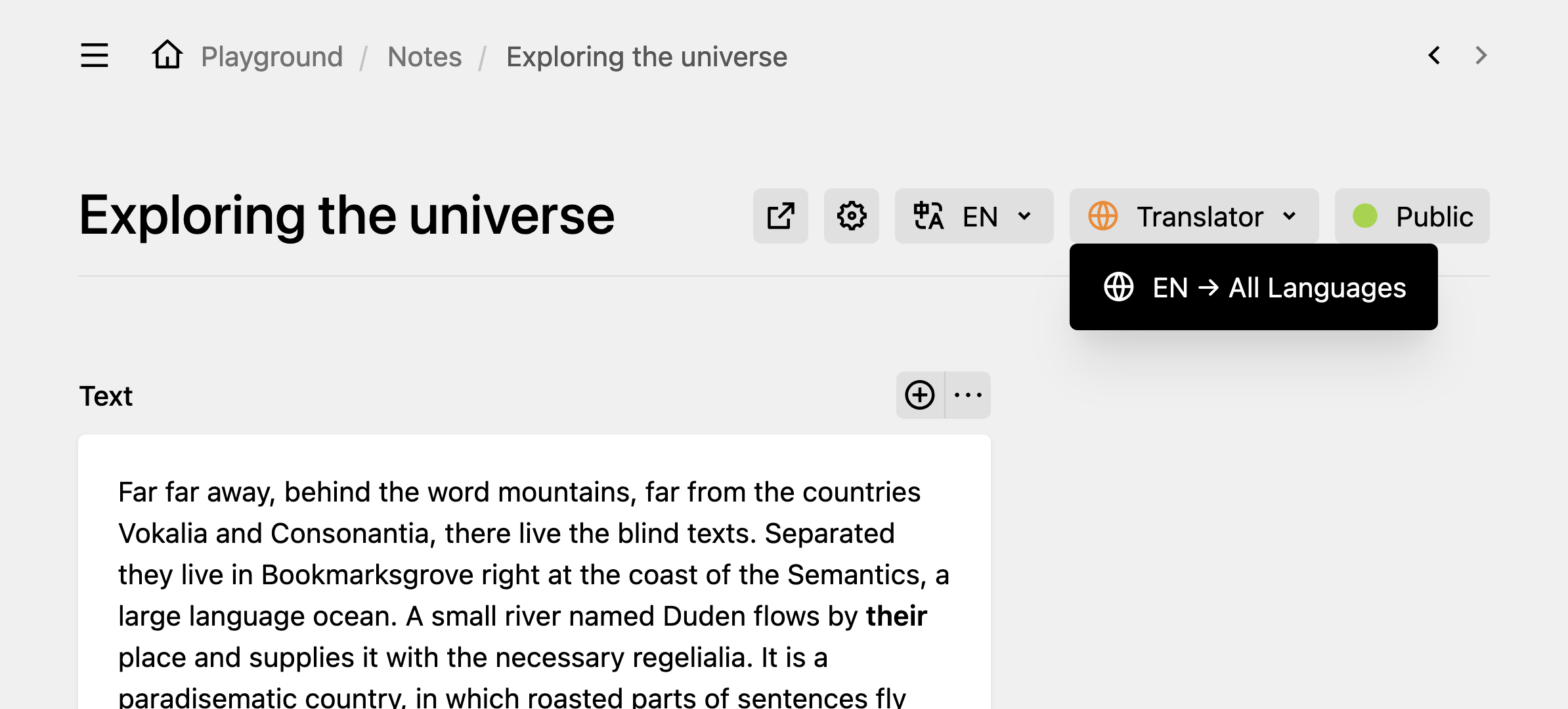
### Basic Setup
To add the `content-translator` button to a Panel view, set the `buttons` option in the corresponding blueprint. Listing `buttons` replaces Kirby's defaults, so name the ones you want to keep – the default set differs per model, and `content-translator` goes wherever it suits the view:
```yaml [site.yml]
buttons:
- open
- preview
- content-translator
- languages
```
```yaml [pages/default.yml]
buttons:
- open
- preview
- "-" # Kirby's default divider
- settings
- content-translator
- languages
- status
```
```yaml [files/default.yml]
buttons:
- open
- settings
- content-translator
- languages
```
### Advanced Configuration
Switch the list to a map when you need to pass props. A map replaces the defaults the same way a list does, so keep naming every button you want – `true` renders one with its own defaults:
```yaml [site.yml]
buttons:
open: true
preview: true
content-translator:
title: true
slug: true
excludeFields:
- description
languages: true
```
```yaml [pages/default.yml]
buttons:
open: true
preview: true
settings: true
content-translator:
title: true
slug: true
excludeFields:
- description
languages: true
status: true
```
```yaml [files/default.yml]
buttons:
open: true
settings: true
content-translator:
title: true
slug: true
excludeFields:
- description
languages: true
```
## Section Configuration
As an alternative to the view button, you can add a Content Translator section to your blueprint. The section displays translation controls directly within the page content area.
### Basic Setup
Add the Content Translator section to any blueprint:
```yaml [pages/default.yml]
sections:
contentTranslator:
type: content-translator
```
The section runs the same translation as the view button but is placed within the blueprint layout. It also accepts one property the view button does not: `systemPrompt`.
This is how the basic section will look in the default language:
When switching to secondary languages, the section buttons will change to **Import** and **Translate**:
### Advanced Configuration
Configure the section behavior with props:
```yaml
sections:
contentTranslator:
type: content-translator
```
```yaml
sections:
contentTranslator:
type: content-translator
title: true
slug: true
kirbyTags:
link:
- text
- title
image:
- alt
- caption
```
## Available Properties
When [configured globally](/docs/content-translator/configuration/global), these properties will apply to both view buttons and sections. Local configurations can override them.
Snippets below show only the property line. Wrap them in `buttons.content-translator` (view button) or `sections.contentTranslator` with `type: content-translator` (section) – see the scaffolds above.
### `label`
Custom label for the Content Translator view button or section. The default depends on the Panel language – in English, "Translator" for the view button and "Content Translator" for the section.
To change the label to "Translate":
```yaml
label: Translate
```
This property is per-blueprint only. To rename the button or section project-wide, override the `johannschopplich.content-translator.viewButton.label` and `johannschopplich.content-translator.label` keys under [Localization](#localization).
### `importFrom`
Controls import direction. Set to `all` to allow importing from any language to any language, including overwriting the default language with content from secondary languages:
```yaml
importFrom: all
```
The button text will indicate that importing from secondary languages is allowed:
By default, only importing from the default language to secondary languages is allowed to prevent accidental overwrites of default-language content. Use `importFrom: all` with caution.
### `import`
Enable or disable content importing functionality entirely.
To hide the import actions in the view button or section, set the `import` key to `false`:
```yaml
import: false
```
### `batch`
Enable or disable batch translation (translating to multiple languages at once).
This property only applies in the default language, where the batch action appears.
Unlike per-language translation, this translation process **is not reversible** in the Panel. Use it with caution, as it may take a while to translate all content.
If you want to *disable* batch translations for multiple languages at once, you can set the `batch` property to `false`. This will hide the batch mode translation button in the view button or section:
```yaml
batch: false
```
### `title`
Include the model title in import and translation operations. This is particularly useful for pages, where the title is often a key piece of content.
```yaml
title: true
```
Title changes cannot be reverted in the content history, unlike field changes. Use with caution.
### `slug`
Similar to the `title` property, the model slug can be included in import and translation operations. What gets translated is the current slug itself, not the title: a page at `about-us` sends `about-us` through the same pipeline as the content, and Kirby sanitises the result into the slug for the target language. Title and slug are translated independently, so the translated slug is not regenerated from the translated title.
```yaml
slug: true
```
The `title` property is ignored on file models, where the title is a regular content field and gets translated with the rest of the content. The `slug` property is ignored on file and site models, since file names remain language-agnostic by design, and on the home and error pages, whose slugs Kirby resolves by route.
### `confirm`
Show a confirmation dialog before an import overwrites the current language. Disabled by default – import runs on the first click.
```yaml
confirm: true
```
This property covers the import actions only. Translation is confirmed by its own dialogs: batch translation always asks which languages to write, and per-language translation asks which provider to use when Copilot is available next to DeepL or a custom strategy.
### `fieldTypes`
Specify which field types to include in import and translation operations. By default, the plugin imports or translates all text-like fields: `list`, `tags`, `text`, `textarea`, `writer`, and `markdown`. These fields can be nested within `blocks`, `layout`, `object`, and `structure` fields.
**Default field types:**
- `blocks`
- `layout`
- `list`
- `object`
- `structure`
- `tags`
- `text`
- `textarea`
- `writer`
- `markdown` (from the [markdown field plugin](https://github.com/fabianmichael/kirby-markdown-field))
- `table` (from the [table field plugin](https://github.com/bogdancondorachi/kirby-table-field))
For example, to include only `text` and `textarea` fields in the translation:
```yaml
fieldTypes:
- text
- textarea
```
To translate text fields within `blocks`, you must include both `blocks` and `text` in the `fieldTypes` array.
When `translate: false` is set on a field, it will be ignored by the translation process, regardless of the `fieldTypes` configuration.
### `includeFields`
Specify the fields to include in import and translation operations. The list narrows the blueprint's top-level fields; everything nested inside a block, structure, layout, or object is reached through its top-level parent rather than by its own name. The `fieldTypes` property is still respected.
For example, to include only `company` and `author` fields in the translation:
```yaml
includeFields:
- company
- author
```
### `excludeFields`
Specify the top-level fields to exclude from the import and translation process. Useful to drop *specific fields* while still including all fields of certain types via `fieldTypes`.
For example, to exclude `description` and `summary` fields from translation:
```yaml
excludeFields:
- description
- summary
```
Fields with `translate: false` in their blueprint definition are automatically excluded.
### `kirbyTags`
Configure selective translation of KirbyTag types and its attributes (e.g., link text, image alt text). By default, all KirbyTags are excluded to preserve URLs, filenames, and technical attributes.
```yaml
kirbyTags:
link: [text, title]
image: [alt, title, caption]
file: [text, title]
email: [text, title]
video: [caption]
```
For the full per-tag attribute reference and translation behavior, see the [KirbyTags Configuration](/docs/content-translator/advanced/kirbytags) guide.
### `systemPrompt`
Override the AI translation system prompt for this specific section, taking precedence over the global `ai.systemPrompt` config option. Sections only – the view button does not declare this property and silently ignores it, so a per-view override has to go through the global option.
```yaml
systemPrompt: >
You are a medical translator.
Preserve clinical terminology
and abbreviations.
```
See the **AI Translation** docs for the full default prompt and usage details.
## Configuration Precedence
Properties are applied in the following order (later values override earlier ones):
1. **Default values** (built into the plugin)
2. **Global configuration** (in `config.php`)
3. **View button & section props** (in blueprints)
```php [config.php]
return [
'johannschopplich.content-translator' => [
'fieldTypes' => ['text', 'textarea'], // Applied globally
'confirm' => true
]
];
```
```yaml
sections:
contentTranslator:
type: content-translator
fieldTypes: # Overrides global config
- blocks
- text
- textarea
# confirm: true inherited from global config
buttons:
content-translator:
confirm: false # Overrides global config
```
## Localization
Override the plugin's default Panel labels by adding translations to your Kirby installation's `languages` directory. Useful when "Synchronize" reads better than "Import" for your editors, or when your project uses a language the plugin doesn't ship translations for.
See the plugin's [`translations.php`](https://github.com/kirby-tools/kirby-content-translator/blob/main/src/extensions/translations.php) for the full list of translation keys.
```php [languages/en.php]
return [
'code' => 'en',
'name' => 'English',
// ... Other language configuration
'translations' => [
'johannschopplich.content-translator.import' => 'Synchronize'
]
];
```
---
Every page of this site as Markdown: